TKG software · CoreCommand®, CoreAI™ and CoreDesign™ Plan the site. Fuse the sensors. Command the response.
CoreDesign™, CoreAI™ and CoreCommand® are one software stack: model coverage before you buy hardware, classify what the cameras see, and run every sensor from one operating picture.
Three products. One workflow.
CoreDesign plans the site. On site, CoreAI reads the video and CoreCommand fuses everything into one picture for the operator.
Plan the coverage
Model coverage, line of sight and sensor siting before hardware is ordered.
Classify on video
Detect, recognize and identify targets on EO/IR cameras.
Fuse and command
One track per target from every sensor, confirmed on camera, with the response attached.
One drone. Three products. One record.
A walk-through of a single drone incursion at a fixed site, from the plan made before installation to the report filed after.
- 01 / PLANCoreDesign™
Months earlier, the site was modeled from terrain and building data. Sensors were placed where coverage closes the gaps.
- 02 / DETECTRadar and RF
A radar track appears at the edge of coverage. RF sensing reports a UAS control link on a matching bearing.
- 03 / CLASSIFYCoreAI™
The camera slews to the track. CoreAI classifies the object on video as a drone.
- 04 / FUSECoreCommand®
Radar, RF and camera reports merge into one confirmed track with speed, altitude and heading.
- 05 / RESPONDCoreCommand®
The track enters an alarm region. Operators get the alert; strobes, sirens or external systems fire as configured; the track is shared to ATAK/WinTAK.
- 06 / RECORDCoreCommand®
Event footage and the track history are kept for the report and the after-action review.
CoreCommand®
Multi-sensor C2. CoreCommand ingests radar, EO/IR, LiDAR, RF and Remote ID, ADS-B, AIS, acoustic and any other source that outputs structured data, and correlates them into one track per target.
- 2D and 3D maps with one track per target
- Open REST API and developer access
- Linux server and web UI, on premises or at the edge
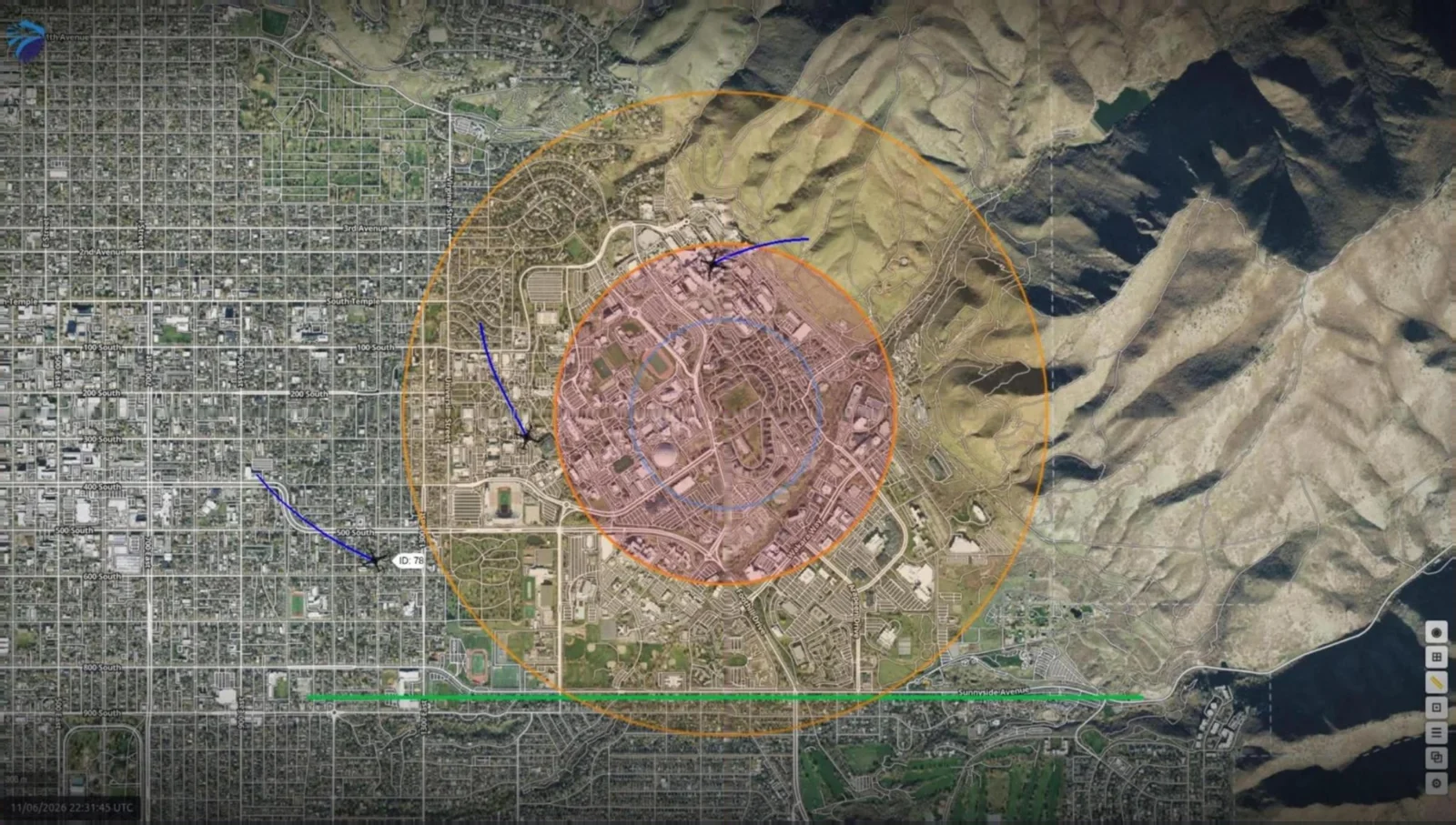
Classification on the video you already have.
CoreAI runs detection, recognition and identification on EO/IR video. It is built on TKG's own models and tuned to need fewer pixels on target, so a camera can classify small objects at distance.
What it does
- Detects and classifies people, vehicles and boats on EO and thermal video
- Confirms radar and RF tracks on camera inside CoreCommand
- Sends classifications to CoreCommand, where they join the fused track
- Runs on premises, not in the cloud
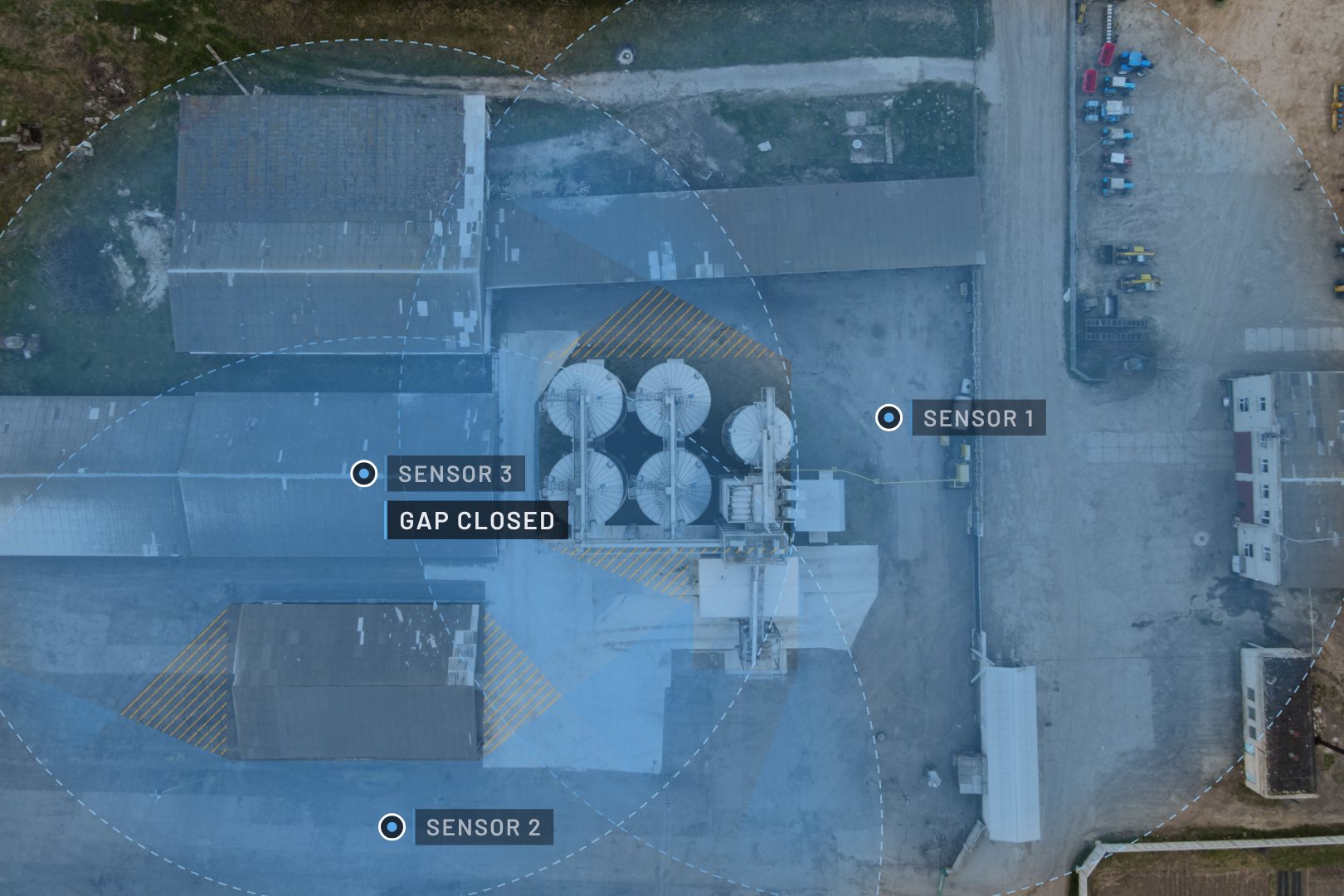
See coverage before you buy the hardware.
CoreDesign models a site from terrain and building data, places sensors, and shows coverage and blind spots before anything is installed. Changes cost minutes in a model, not weeks in the field.
What you get
- A site model with sensor positions and mount heights
- Coverage and blind-spot views for each sensor layer
- A proposal-ready plan that TKG engineers review with you
Bring the sensors you have.
If a sensor or system outputs structured data, CoreCommand can use it. Every source shows on one map, and tracks that line up are fused into one.
- Typical inputs
- EO/IR cameras, commercial and military · Ground radar, 2D, 3D and 4D · LiDAR · RF/DF and Remote ID · ADS-B and AIS · Acoustic sensors · Generic feeds over standard network and messaging protocols
- Outputs
- VMS (Genetec RSA, Milestone XProtect, Avigilon) · ATAK/WinTAK · REST API · Alerts and external actions
What the stack does, by mission.
A white paper and a case study for each mission TKG supports.
Counter-UAS
Fuse radar, RF and Remote ID into one drone track and confirm it on camera.
Critical infrastructure
Watch fence lines and airspace together and record every event for compliance.
Airports
Separate drones from manned traffic with ADS-B and share tracks with airport operations.
Correctional facilities
Catch drone drops and ground approaches on the same map.
Defense and federal sites
Run on premises, under federal security controls, on fixed or deployable systems.
Major events
Stand up temporary detection and share one picture with police and event security.
Built for secure sites.
CoreCommand runs on premises or at the edge, on a Linux server with a web interface, with the controls federal sites review before go-live.
CoreCommand was delivered as the on-premises C2 layer for a government research site.
- Security controls
- NIST SP 800-53 Rev. 5 compliant
- Deployment
- On premises or at the edge · Linux server · web UI
- Data protection
- Encryption in transit and at rest
- Access
- Role-based access control · audit logging
- Integration
- Open REST API · VMS · ATAK and WinTAK
- Sensors
- Sensor-agnostic: any source that outputs structured data
Questions buyers ask about the Core software.
Do I need all three products?
No. CoreCommand runs on its own. CoreDesign is used before installation and CoreAI adds video classification where cameras are part of the system.
Can CoreCommand work with sensors we already own?
Usually, yes. CoreCommand ingests any source that outputs structured data. TKG confirms each sensor during design.
Which sensors does the Core software work with?
CoreCommand is sensor-agnostic. It ingests radar, EO/IR, LiDAR, RF and Remote ID, ADS-B, AIS, acoustic and any other source that outputs structured data. If a sensor isn't integrated yet, ask us about it.
Where does it run?
On premises or at the edge. CoreCommand is a Linux application with a web interface, installed on a dedicated server or virtual machine at fixed sites, or on deployable and vehicle-mounted systems.
Does it meet federal security requirements?
CoreCommand is NIST SP 800-53 Rev. 5 compliant, with encryption in transit and at rest, role-based access control and a full audit log.
Can it share data with systems we already run?
Yes. Tracks and alerts go to video management systems such as Genetec RSA, Milestone XProtect and Avigilon, to ATAK and WinTAK, and to third-party systems through the open REST API.
What does CoreDesign deliver?
Coverage proofs, a sensor siting and deployment plan, and CSI MasterFormat Division 28 construction specifications, before hardware is ordered.
Who supports the system after it's installed?
TKG configures CoreCommand for each site and provides ongoing support. For customers who want to run their own platform, TKG also provides onsite training for operators and administrators.
See the Core stack running.
CoreDesign, CoreCommand and CoreAI, walked through live by a TKG engineer.